How to Create Your Custom T-Shirt Design Using Placeit: A Step-by-Step Guide
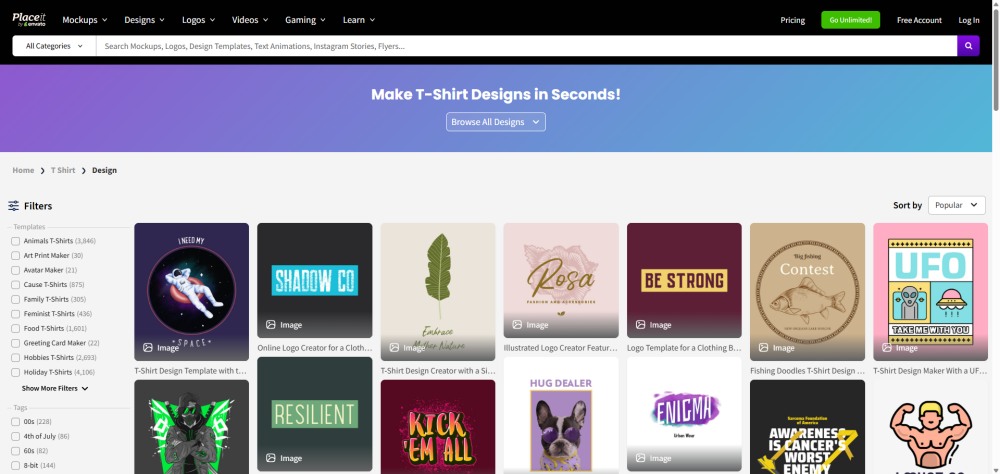
Placeit is a powerful tool for creating custom, print-on-demand T-shirt designs. If you're looking to start a print-on-demand business but don't know where to begin, this detailed guide offers the solution. We'll show you how to use Placeit to create custom T-shirt designs and impressive mockups. We'll also guide you through using Placeit T-shirt design templates and selling them through PeaPrint.
What is Placeit?
Placeit is an all-in-one online design platform primarily aimed at e-commerce entrepreneurs, YouTube users, and social media marketers. If you don't want to learn complex software like Photoshop or Illustrator, Placeit can provide the professional visual effects you need. You don't need any design experience; you can directly open the webpage and design in your browser.
If you want to save time on design, Placeit is definitely your best friend. It's easy to use, and even complete beginners can get started quickly.
Key Features of Placeit
Mockups: This is Placeit's core feature. You can upload designs (such as T-shirt patterns or logos), and it will automatically overlay them onto high-quality photos or videos. It covers a wide range of applications, from clothing and mugs to billboards.
Design Templates: Thousands of templates available for social media posts, flyers, and banners.
Logo Maker: You can enter your brand name and industry to generate hundreds of editable logo concepts.
Video editing tools: Easily create introductory videos, slideshows, or Instagram Reels-style content using music and media libraries.
Placeit typically operates on a subscription model (monthly or yearly), with subscription fees as low as $7.47 per month. Subscribers can download unlimited stock materials , and crucially, all downloads include commercial licenses, which is essential for print-on-demand businesses . They also offer a large number of free templates, allowing users to test quality or use them for other products before paying .
How to Design Personalized T-Shirts Using Placeit ?
Creating T-shirt designs with Placeit is incredibly easy. After registering a free account, you'll have access to thousands of different, high-quality T-shirt design templates. You can use them directly if you like, but we don't recommend it, as almost everyone can use these templates, and without modification and adjustment, you might end up with unoriginal and generic designs. Therefore, you can adjust them to suit your own style.
To better understand how to use Placeit templates in T-shirt design, here is a step-by-step breakdown of the process.
1. Choose the template
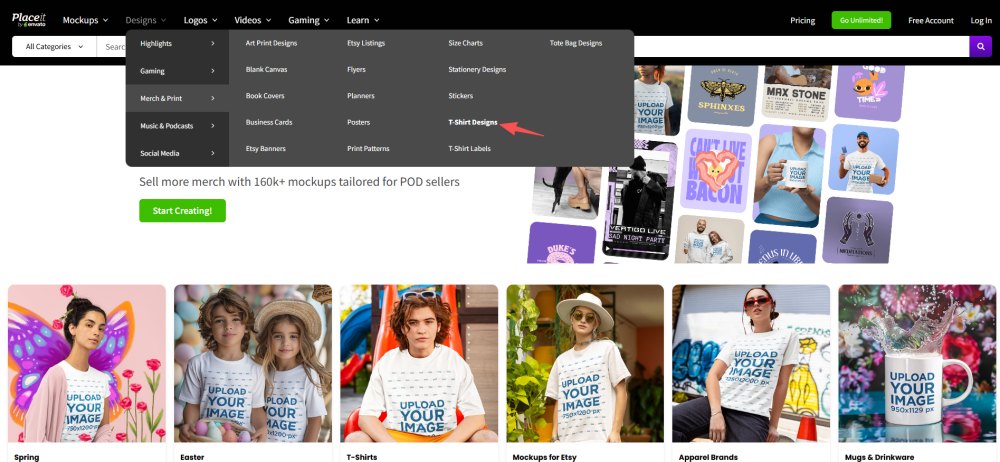
Select "Design" from the top menu.
Select T-shirt design from the Merchant & Print drop-down menu.
The left-hand filter tabs cover the vast majority of T-shirt design themes and areas, allowing you to filter and search using specific keywords. These templates are all customizable, with images and text that can be changed to your liking. If you're unsure whether Placeit is right for your business, you can opt out of a subscription and try out their free templates to see if you like the design tool.
2. Create your t-shirt design
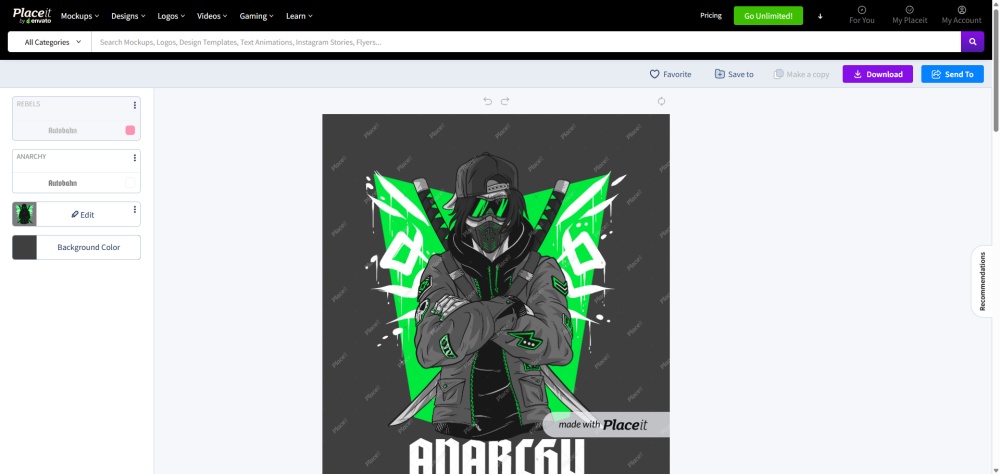
Find your favorite T-shirt design template among a huge selection, click "Edit" to enter the Placeit T-shirt Designer. On the left, you can change the text, font, and background color, or add more text and graphics.
In the main image editor, you can find many other similar related images. You can also enter keywords in the search bar to filter and select a new image to replace the original. Alternatively, you can upload a PNG image with a transparent background from your device to replace the original image.
If there is editable text in the image, it will be displayed in the left toolbar. You can find the corresponding text and modify its content, font, and color one by one. Each image and text box is draggable, allowing you to easily adjust their position.
You can also click on the background color bar to change the background color or remove it completely for use in product mockups.
3. Download your new design template
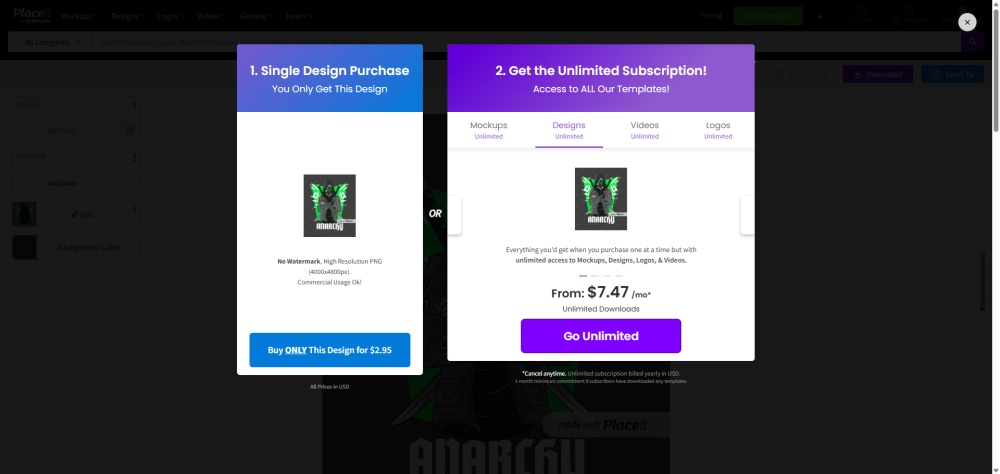
If you're satisfied with the design, you can download it to your device and use it in your mockup generator. Placeit 's free account includes a free high-resolution design. So, if you enjoy the trial, a paid subscription might be more worthwhile, as your custom T-shirt business will require far more than just this one design.
If you work with PeaPrint or other on-demand printing platforms, these ready-made T-shirt designs can be directly uploaded to the platform's mockup generator for use, which is very convenient.
4. Create and download product mockup
In the top menu, under "Mockups," find "Clothing" - "T-shirts." Like the design templates, T-shirt mockups are also categorized by tags. These tags allow you to find images from a vast image library depicting various life scenes, flat lay images, and other occasions, which you can use to create realistic T-shirt mockups.
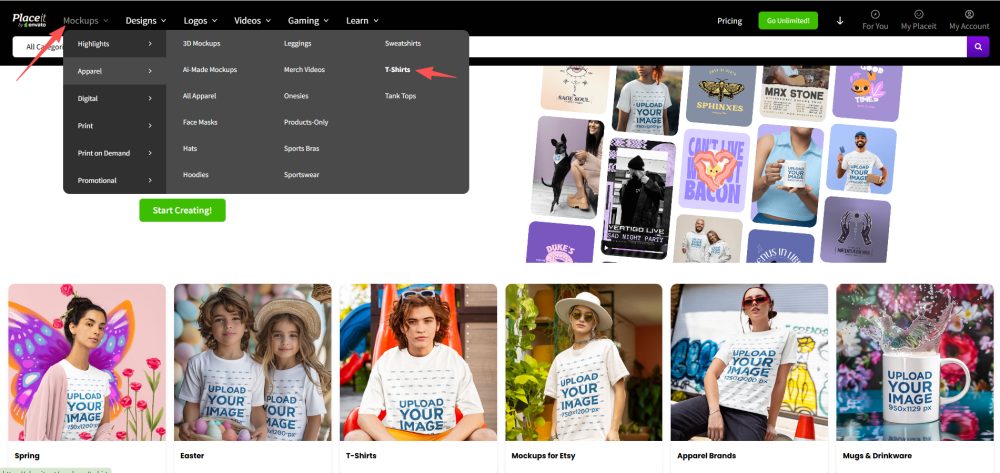
Choose a suitable scene image according to your needs, click "Edit" to enter the mockup studio. All editable elements in the image will be displayed in the toolbar on the left. You can upload the design you just saved, or change the color of the T-shirt. You can also click at the bottom to add some text and graphics you want to make it more interesting and truly your own creation.
After uploading your design, you can crop and scale it to fit the scene. Your actions will be previewed in real-time in the editor, allowing you to see the shape and exact position of the design. Once you're satisfied with the design, click "Crop." The image will then be downloaded. However, single downloads are very expensive, so a subscription is still the best option.
These mockup designs are of excellent quality and flawless; you can use them on social media and in your online T-shirt store.
However, if you're creating a T-shirt mockup for online sales, PeaPrint's product creation tool is sufficient for your needs. Furthermore, you can connect it to your store for easier and faster product listing.
How to sell your Placeit t-shirt designs with PeaPrint?
PeaPrint is an print on demand platform. print-on-demand is a very unique business model. You don't need to invest much, and the operating risk is extremely low. Essentially, you just need to convert your Placeit t-shirt designs into mockups and then publish them to your store for sale. Printing and production only begin after the customer pays.
Because the products are printed on demand, there is no waste, and crucially, you don't need to invest in inventory and warehousing costs. Furthermore, you don't need to handle orders, packaging, or shipping; the entire process is handled by your on-demand printing partner.
If you're looking to sell the T-shirts you design on Placeit, choosing a platform like PeaPrint is the best option. Here are a few simple steps to selling through PeaPrint.
Register PeaPrint
To sell T-shirt designs through PeaPrint, you first need to register a free PeaPrint account, which only requires an email address and a minute.
Pick a T-shirt from the product catalog.
PeaPrint's product catalog features a wide variety of T-shirts, with over a hundred designs and more constantly being added. Select your favorite product and click "Design" to access our product creation tool, our free mockup generator.
Upload your Placeit T-shirt design
Similar to creating a mockup on Placeit , you can upload your saved design from Placeit , adjust its position, preview it, and save it. This completes a simple t-shirt mockup for e-commerce sales. These images can be used for product demonstrations and detailed descriptions.
Connect your store
PeaPrint allows you to integrate with some of the most popular e-commerce platforms and marketplaces, such as Shopify, WooCommerce, Etsy, and Amazon. You can choose the platform that suits you best and connect PeaPrint to your store.
Released and on sale
You can prepare product mockups and images, and refine your product descriptions within the PeaPrint control panel. Once integrated, you can easily publish them directly to your store for sale. You can also edit product descriptions and prices in your store's backend.
FAQs
Is Placeit free?
Placeit isn't free; they offer a very limited number of free templates. However, their paid plans are very cost-effective. An annual subscription effectively unlocks a vast library of mockups, design templates, and other design tools for just $7.47 per month. If you're in the on-demand T-shirt printing business, Placeit is almost a perfect choice.
Which is better, Placeit or Canva?
Canva is a strong competitor to Placeit. However, Placeit excels in creating product mockups and quickly outputting T-shirt designs, making it more suitable for product design. But if your needs involve running a website, writing blogs, copywriting, or team collaboration, Canva is an all-around design tool. Whether it's banners or social media posters, Canva's design flexibility far surpasses Placeit's.
Besides T-shirts, what other products is Placeit suitable for designing?
Placeit's value extends far beyond T-shirt design . You can also use it to design home and office products, electronics accessories, sports and apparel items, and even social media and brand campaigns.