How to Lower Your Cart Abandonment Rate: A Step-by-Step Guide for Online Stores
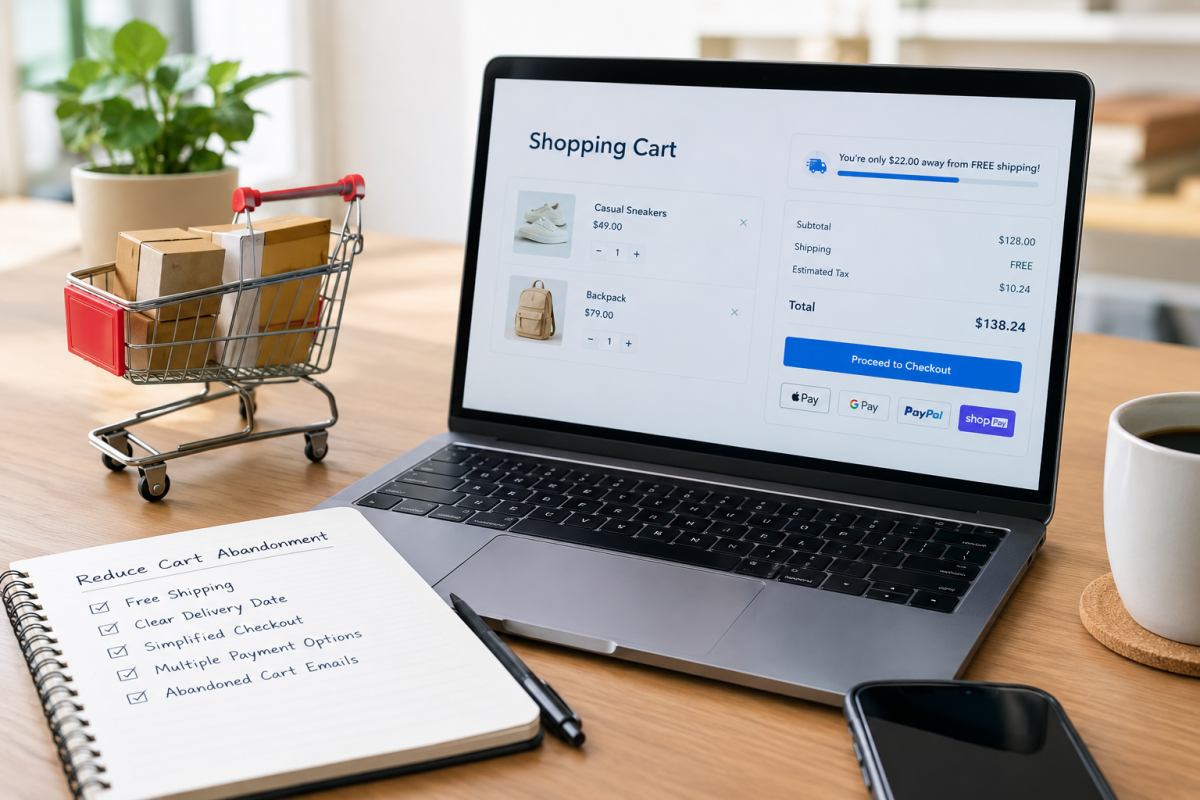
Shopping cart abandonment is a common phenomenon for every online store, with approximately 70% of shoppers leaving without completing their purchase. The value of these abandoned carts is substantial, yet much of this potential revenue can be recovered with the right strategy. In this guide, we will analyze the reasons why shoppers abandon their carts and provide detailed solutions to help you recover these lost sales.
What is cart abandonment?
Cart abandonment occurs when a customer adds items to their shopping cart but leaves the store before completing the checkout process. For sellers, this represents the loss of traffic that has reached the very bottom of the conversion funnel—visitors with a high intent to purchase. This differs from a typical website exit; by adding items to their cart, the customer has signaled a genuine desire to buy, yet they have abandoned the purchase for some reason—reasons that are often linked to your store's policies.
How to Calculate Cart Abandonment Rate
The formula for calculating the cart abandonment rate is straightforward: divide the number of completed orders by the total number of carts created, subtract this result from 1, and multiply by 100%.
For example, if 1,000 customers added items to their carts in your online store last month, but only 250 completed their purchases, the abandonment rate would be: (1 - 250 / 1,000) * 100% = 75%.
How to find a list of customers who have abandoned their carts in your online store:
1. Shopify: Log in to your Shopify admin, click "Orders" in the left-hand menu, and select "Abandoned checkouts" from the drop-down submenu. This list displays visitors who provided their contact information but did not complete their purchase, including their email addresses, the items in their carts, the time of abandonment, and the total cart value.
2. WooCommerce: The core WooCommerce functionality does not automatically save information for visitors who fail to complete a purchase. You will need to use a dedicated cart recovery plugin (such as "WooCommerce Cart Abandonment Recovery" or "Mailchimp for WooCommerce").
What is the average cart abandonment rate?
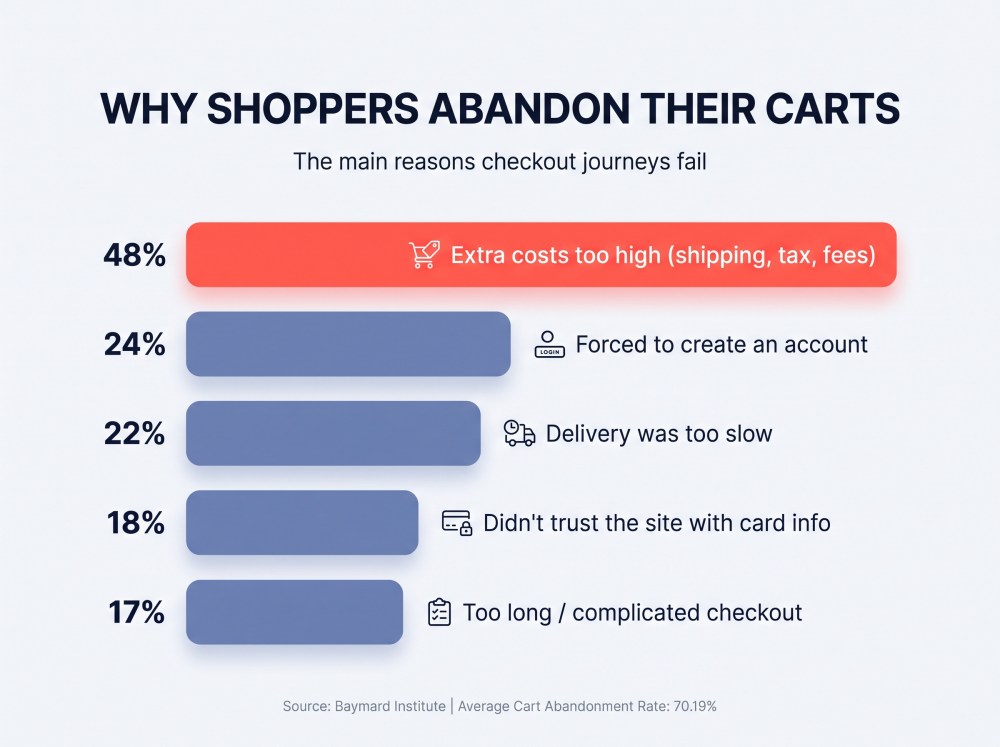
According to comprehensive data tracked over many years by the Baymard Institute, an organization specializing in e-commerce user experience research, the average global cart abandonment rate for the e-commerce industry is 70.19%.
Abandonment rates vary significantly based on device and industry:
- By device: Mobile devices (smartphones) typically see the highest abandonment rates (approximately 85%), while desktop platforms—which generally offer a smoother checkout experience—have relatively lower rates (around 73%).
- By industry: For sectors like apparel and fast-moving consumer goods (FMCG), the rate typically falls between 65% and 70%. In contrast, categories involving higher price points and longer decision-making cycles—such as high-value custom products or furniture—can see abandonment rates as high as 80% or more.
How Much Can Recovering Abandoned Orders Boost Sales?
Recovering abandoned carts is the most direct way for e-commerce businesses to increase profit margins, as these users have already moved past the costly customer acquisition phase. By implementing well-structured abandoned cart email flows and SMS reminders, businesses can typically recover 10% to 15% of lost orders.
For instance, if your store generates $10,000 in actual monthly revenue with an abandonment rate of 70% (implying roughly $23,300 in potential lost sales), recovering just 10% of those abandoned orders would add $2,330 to your monthly revenue—at virtually no additional advertising cost.
Beyond proactive email recovery, Baymard estimates that simply optimizing the checkout process, such as offering guest checkout or eliminating hidden shipping costs, can boost the overall conversion rate of large e-commerce sites by an average of 35.26%.
Why do shoppers abandon their shopping carts?
Before you start looking for ways to recover abandoned carts, consider which issues are actually worth your time and effort to address. Shopper cart abandonment generally falls into two categories: those at the top of the purchase funnel who are "just browsing" or comparing prices, and high-intent customers who drop off due to friction in the checkout process. The former group is essentially "window shopping"—they use their cart as a wishlist, a price-comparison tool, or a place to save items for later; no amount of checkout optimization will convince these users to complete a purchase immediately.
For e-commerce merchants, the latter group is the primary source of lost profit. Here are the main reasons why genuine shoppers abandon their carts:
1. Unexpected extra costs (shipping shock and hidden fees)
2. Forced account creation
3. Long or unclear delivery times
4. A complicated or lengthy checkout process
5. Limited payment options
6. Credit card rejection
7. Security and trust concerns
8. Unsatisfactory return policies
These are the issues that truly require your attention. Addressing them will significantly reduce your cart abandonment rate. Let's look at what you can do to ensure that potential customers actually convert.
16 Ways to reduce shopping cart abandonment
1. Add a Dynamic Free Shipping Progress Bar to Your Slide Cart
Unexpected shipping costs can quickly turn an attractive deal into an abandoned cart. A dynamic free shipping progress bar makes your shipping threshold visible when shoppers open the side cart or cart drawer.
Instead of relying on a static banner at the top of your website, show customers exactly how much more they need to spend to qualify for free shipping. Update the message automatically whenever they add or remove an item. This can encourage additional purchases while making your shipping offer easier to understand.
For example:
"Spend $14 more to qualify for free shipping! Add another item to unlock this offer."
Be sure to set a reasonable free shipping threshold based on your average order value and profit margins. Additionally, clearly state the terms and conditions, including any exclusions.
2. Replace Vague Transit Times With Estimated Delivery Dates
Customers shopping for gifts or personalized products want to know when their orders will arrive. A message such as "Shipping takes 5–10 business days" forces them to calculate the delivery window themselves and leaves room for uncertainty.
Use an estimated delivery date (EDD) that combines production time and shipping time. This is especially valuable for print-on-demand (POD) businesses, where an item must be made before it ships.
Weak: "Production time: 3 business days. Shipping: 5–8 business days."
Better: "Order now and expect delivery on Thursday, December 10th."
Display delivery estimates on product pages and in the cart, and account for weekends, holidays, destination, and fulfillment location when possible. Clearly label estimates rather than guarantees, especially for international orders.
3. Add a Shipping and Tax Calculator Directly to the Cart
Shoppers shouldn't have to fill out an entire checkout form just to discover how much shipping will cost. If you can't offer free shipping on every order, add a shipping estimator to the cart page. For U.S. customers, a ZIP code field can help estimate delivery charges before checkout. Where your platform supports it, show estimated sales tax and other applicable costs at the same time.
By enabling a ZIP code-based estimator directly within the shopping cart, you allow customers to get a clear idea of their total order cost before they proceed to payment.
Clearly label all estimated figures and explain that the final total may be subject to change. For cross-border sales, provide transparent and easy-to-understand information regarding potential customs duties, taxes, and other import-related charges.
4. Build Base Shipping Costs Into Product Pricing
Some customers prefer a straightforward product price with free shipping over a lower advertised price followed by an additional delivery charge.
For example, a shopper may prefer a $35 T-shirt with free shipping to a $28 T-shirt plus $7 shipping, even though the total is identical. This pricing strategy can make the buying decision feel simpler and reduce unpleasant surprises.
Calculate your average fulfillment costs, product costs, and target margins before adjusting retail prices. You can test free shipping across selected products or offer it above a minimum order value.
5. Make Guest Checkout the Default, Unmissable Option
Requiring customers to create an account before purchasing adds friction, particularly for first-time buyers who don't yet have a reason to register.
Offer guest checkout as a prominent option rather than hiding it behind a sign-in form. Once the order is complete, invite customers to create an account on the thank-you page using their existing order details.
Copy Example:
"Check out as a guest. You can create an account after placing your order to track purchases and save your details."
This approach lets shoppers complete their purchases first while giving them a convenient way to build a relationship with your brand later.
For POD sellers, include production costs, shipping zones, and payment or platform fees in your calculations. Free shipping should improve conversion without making every order less profitable.
6. Put Express Checkout Buttons Above the Fold
Typing a full shipping address and credit card number on a phone can be frustrating. Express checkout options reduce manual input and help customers complete purchases more quickly.
Where supported, offer Shop Pay, Apple Pay, Google Pay, and PayPal. Place relevant options near the top of the cart or checkout page so customers can find them without scrolling through multiple fields.
Test the layout on real mobile devices. Too many competing buttons can clutter the page, so prioritize payment methods that your audience actually uses.
7. Offer Buy Now, Pay Later for Higher-Value Carts
For higher-priced products, installment payments may help customers manage the upfront cost. Services such as Klarna, Afterpay, and Affirm are worth considering if they're available for your business and target customers.
Don't wait until the final payment step to mention financing. Where permitted, display eligible installment options on product pages and near the cart total so shoppers can consider them before checkout.
Copy Example:
"Or pay in 4 interest-free installments of $22.50 with an eligible payment provider."
Only display accurate payment terms and approved offers. Consider provider fees, eligibility requirements, and potential effects on margins before making installment payments a core part of your checkout strategy.
8. Simplify Checkout With Address Autocomplete
Long checkout forms create unnecessary work. Review every field and remove those that aren't essential for order fulfillment, payment processing, or legal compliance.
Use a streamlined checkout layout and enable address autocomplete through your ecommerce platform or a supported integration. With address suggestions, shoppers can enter the beginning of an address and select a match instead of manually typing every detail.
You should also provide a clear option to use the shipping address as the billing address. Avoid asking customers to enter the same information twice.
A one-page checkout isn't automatically better for every store. Test changes against your existing checkout flow and measure completed purchases to determine what works best.
9. Hide or Collapse the Promo Code Box
A large, empty discount code field can make shoppers wonder whether they're missing a better deal. Some customers will leave checkout to search Google for coupon codes and never return.
If your platform allows it, collapse the field into a subtle expandable link instead of displaying a prominent input box.
Copy Example:
"Have a promo code? Enter it here."
You can also use automatic discount links to apply eligible offers without requiring customers to enter codes manually. This makes promotions easier to redeem and reduces unnecessary checkout friction.
Don't hide discount terms or make advertised offers difficult to access. The goal is to remove distractions, not prevent shoppers from using valid promotions.
10. Place Security Messaging Below the Payment Button
Customers need confidence that their payment information will be handled securely, especially when purchasing from an unfamiliar independent store.
Use a reputable payment processor, maintain a secure website, and display accepted payment methods near the payment area where appropriate. A short reassurance message can help explain how payments are processed.
Copy Example:
"Your payment information is encrypted and processed securely."
Avoid fake trust badges or unsupported claims such as guaranteed protection against every kind of fraud. Genuine security practices and clear communication build more confidence than decorative icons alone.

11. Highlight Your Return Policy Inside the Cart
Uncertainty about sizing, product quality, or returns can prevent customers from completing an order. Rather than expecting them to search your footer for a lengthy policy, provide a short summary near the cart or product details.
Copy Example:
"Need a different size? Review our exchange policy before ordering."
For POD sellers, explain how defective or damaged products are handled and whether personalized items are eligible for returns. Custom products may have different return conditions depending on your policy and applicable law.
Only promise free returns, exchanges, or quality guarantees if your business can honor them. Link the summary to your complete return policy for customers who need more details.
12. Keep Product Thumbnails and Custom Specifications Visible
Customers should be able to confirm exactly what they're buying without returning to the product page.
Keep product thumbnails, titles, quantities, prices, and selected variants visible throughout checkout wherever possible. For personalized products, also show relevant details such as names, colors, sizes, design options, and customization instructions.
This is particularly important for POD merchandise, where a small mistake in a name or size can make the finished product unsuitable.
Allow customers to edit their cart before payment and preserve their selections when they return to checkout. A clear order summary helps prevent mistakes and gives shoppers one less reason to leave.
13. Trigger a Live Chat Prompt When Shoppers Hesitate
A customer may be ready to buy but unsure about sizing, shipping restrictions, or production times. If they can't find an answer quickly, they may abandon checkout.
Instead of displaying a disruptive chat window across your entire website, set behavioral triggers to offer help when shoppers appear stuck. For example, test a subtle prompt after someone spends 60 seconds on the cart or checkout page without interacting.
Copy Example:
"Questions about sizing, shipping, or your order? Ask us here. We're happy to help!"
Make sure your team can meet any response-time promise you advertise. If support isn't available around the clock, set clear expectations or link to a helpful FAQ.
14. Use Exit-Intent Pop-Ups to Offer More Than Discounts
Exit-intent pop-ups give hesitant shoppers one last reason to reconsider. Desktop tools typically detect cursor movement toward the edge of the page, while mobile implementations may use different behavioral signals.
Rather than automatically offering a 15% discount, test alternatives that protect your margins. Depending on your business, these could include free shipping, a relevant gift, or an option to save the cart for later.
Copy Example:
"Not ready to check out? Save your cart and pick up where you left off."
Avoid showing the same pop-up repeatedly or interrupting customers who are already progressing through checkout. Track purchases and profit per visitor to determine whether the incentive actually helps.
15. Offer a Save Cart for Later Feature
Not everyone who leaves a cart has lost interest. Some shoppers are comparing options, browsing during a work break, or waiting to discuss a purchase with family.
A save-for-later feature allows them to return when they're ready. Offer a persistent cart for returning visitors or, where supported, a button that emails the customer a direct link to their saved cart.
Copy Example:
"Need more time? Email yourself this cart and come back whenever you're ready."
Preserve product variants and customization details so shoppers don't have to rebuild their carts from scratch.
If you collect email addresses, explain how they'll be used and follow applicable privacy and marketing consent requirements. Saving a cart should not automatically enroll someone in unrelated promotional campaigns without the necessary permission.
16. Build a Three-Step Abandoned Cart Email and SMS Flow
Automated recovery messages can bring interested shoppers back after an interruption. The key is to start with helpful reminders instead of immediately giving away profit through discounts.
Step 1: Send a Friendly Reminder After 1–4 Hours
Assume the customer may simply have been distracted. Include the abandoned products, a direct link to restore the cart, and an easy way to contact customer support.
Subject line: Still thinking it over?
Email copy:
"Your favorites are still waiting. Pick up where you left off whenever you're ready. Have a question about your order? Just reply to this email."
Don't lead with a coupon. Some shoppers only need a reminder to finish their purchase.
Step 2: Reinforce Trust After 24 Hours
If the customer hasn't purchased, send a second message featuring relevant reviews, customer photos, sizing information, or your return policy.
Subject line: A closer look at what's in your cart
Focus on the questions most relevant to your products. Apparel sellers might highlight sizing guidance, while POD gift stores could explain production timelines and estimated delivery dates.
Only mention limited stock or time-sensitive offers when those claims are accurate.
Step 3: Test a Targeted Incentive After 48–72 Hours
Reserve the final message for customers who still haven't purchased. If your margins allow it, test a modest discount or free shipping offer for eligible carts above a threshold, such as $75.
Subject line: A little something to help you decide
Email copy:
"Still interested? Use [CODE] for [OFFER] before [EXPIRATION TIME]. Your offer is valid on eligible orders under the terms provided."
Use customer history, cart value, and profitability to decide who receives an incentive. You can also test a final reminder without a discount to see whether the added cost produces enough additional sales.
For SMS, obtain the required consent and follow applicable messaging laws. Suppress recovery messages once a customer places an order, and coordinate email and SMS so shoppers don't receive repetitive reminders.
Final Thoughts
Learning how to reduce shopping cart abandonment isn't about persuading every visitor to buy. It's about making the purchasing process clearer, easier, and more trustworthy for customers who are ready to order.
Start with the biggest sources of friction: unexpected shipping costs, uncertain delivery dates, and unnecessary checkout steps. Then introduce better customer support and a targeted abandoned cart recovery sequence.
FAQs
What Is the Most Effective Way to Reduce Shopping Cart Abandonment?
The most effective approach depends on why shoppers leave your store. Start by making shipping costs and estimated delivery dates clear, simplifying checkout, offering guest checkout, and providing familiar payment options. Use analytics to identify your biggest drop-off points, then test improvements based on actual customer behavior.
Should You Offer Discounts to Reduce Cart Abandonment?
Not necessarily. Discounts can encourage some shoppers to complete their purchases, but offering them too early may reduce profit margins or train customers to wait for promotions. First address common concerns such as shipping costs, delivery times, and payment friction. Then test limited incentives for eligible carts and measure their effect on profit.
How Can You Reduce Shopping Cart Abandonment on Mobile Devices?
Make mobile checkout easy to navigate with clearly labeled buttons, express payment options, autofill features, and a streamlined form. Keep shipping costs, delivery estimates, and order details visible. Test the entire buying process on different screen sizes, and fix usability issues that make customers scroll excessively or re-enter information.